
Create editable, presentation-ready org charts in minutes. Built to update as quickly as your organization changes. So you can stop wasting time on formatting and focus on what really matters.
Finally, professional
org charts done right.

Finally, professional
org charts done right.
Create editable, presentation-ready org charts in minutes. Built to update as quickly as your organization changes. So you can stop wasting time on formatting and focus on what really matters.
Your org chart headaches end here
Reorgs and new hires shouldn’t derail your week. Static images, formatting battles, and version chaos waste time and slow decisions.
Built by an HR pro, Savvy Org Charts quickly and easily turns your employee data into accurate, editable org charts without ever leaving Excel. No more rebuilding from scratch. Just one chart that’s always current and ready to share.
With org analytics built in, you can go beyond reporting to shape strategy, guiding decisions about structure, talent, and growth.
And because your time is finally your own again, you can use it for the things that really matter. Launch a new initiative, go for a run, plant that vegetable garden… whatever makes your work more meaningful and your life a little fuller.
PRAISE FROM A HAPPY CUSTOMER
“This is the tool others have been trying to create for decades. Because it runs in Excel—software I use every day—it dramatically reduces the manual effort of creating and revising org charts, making org design and scenario planning easier and more impactful.”
See how it works
Demo: Savvy Org Charts builds org charts, succession plans, and HR analytics from your Excel data, then exports to PowerPoint — without leaving Excel.

Built by an HR pro who gets it
Reclaim your time
Quickly create org charts from your existing employee data. Skip the onboarding. Just select your Employee ID, Name and Manager columns from any existing Excel data and build your hierarchy in seconds.

Keep data secure
Everything happens in Excel. No uploads, no external platforms, and no new tools to approve, so your data stays under your existing security controls.


The Microsoft 365 Certification logo represents that this app has achieved Microsoft 365 Certification. In addition to app security, this program reviews the practices and procedures the app publisher employs. While customer data is under control of the app publisher, you can rest assured that Microsoft has validated that the app will handle it in a safe and secure manner.
Understand today. Plan for tomorrow.
Spot structural issues like too many layers, uneven spans of control, or pay gaps. Model scenarios, compare options side by side, and make decisions based on data, not hunches.

Make confident talent decisions
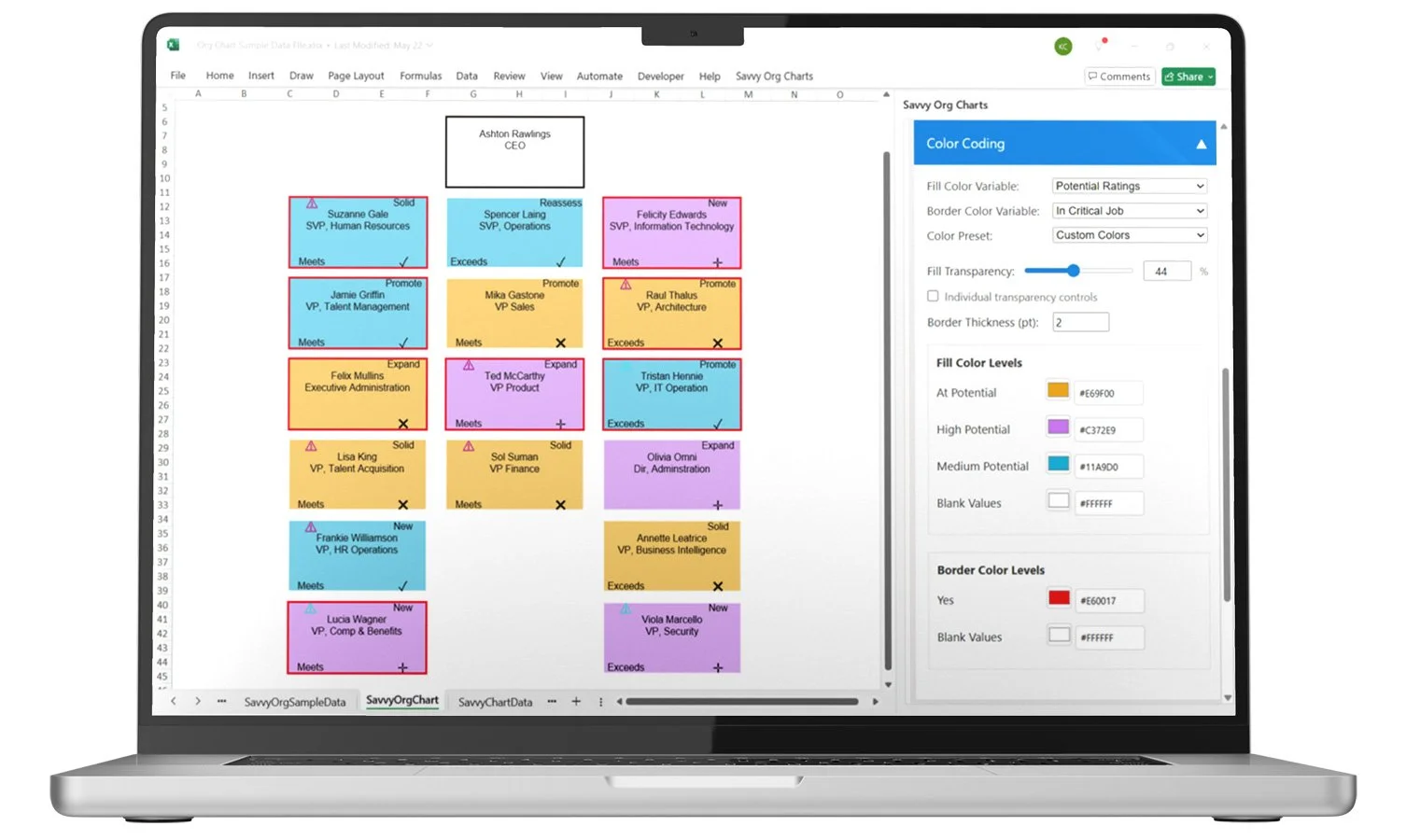
Highlight high potentials, critical roles, and key attributes with customized icons and colors. Choose the fields that matter — performance, readiness, tenure, demographics— and reviews move faster with fewer misses.
Stay current & presentation-ready
Make changes as your org shifts, then export to PowerPoint with full editability. Resize, move, and customize right in your presentation. No static screenshots, no reformatting headaches, and everyone always sees the latest version.

Built for how you actually work
Key features:
-
Build professional org charts directly in Excel using your existing organizational data. Your org data stays in Excel—no uploads to external platforms—ensuring your sensitive personnel information remains entirely under your control. Created for Excel users by Excel experts, this add-in leverages your existing skills with no new software to learn.
-
Unlike traditional org chart solutions that produce static images, Savvy Org Charts creates fully editable diagrams. Make instant changes to your chart structure, update information, or adjust designs without rebuilding from scratch. Your org charts remain fluid and adaptable as your organization evolves.
-
Get immediate visibility into the health and structure of your organization. Instantly surface key metrics—like management layers, span of control, compensation distribution, and role changes—so you can see what's working and what's not. Click any metric to drill into interactive tables and charts, view employee profiles, or build org charts directly from the data. Compare metrics across teams or leaders, and export your analysis to Excel for reporting.
-
Explore potential org changes before you make them. Create and test different scenarios, like adding or eliminating roles, shifting reporting structures, or adjusting compensation, and compare them side-by-side against your current state. Make bulk changes to move entire teams at once. View the impact on key metrics, build org charts from any scenario, and make confident reorganization decisions without relying on guesswork.
-
Choose between 1, 2, or 3-level deep hierarchies for the right level of detail. Control exactly which employee information appears in each box, filter views by leader or any employee attribute, sort by any data field, and apply consistent color-coding to highlight what matters most. Every aspect of your org chart is customizable to meet your specific requirements—all without complicated formatting work.
-
Save your favorite layouts and styling choices as presets. Quickly switch between different chart styles for various audiences without reconfiguring settings each time.
-
Create presentation-ready org charts that transition perfectly to PowerPoint. With a simple copy and paste, your professionally designed charts maintain full visual quality in presentations, with no reformatting needed. Need to make changes within PowerPoint? Resize, move, and customize right in your presentation.
New features in development:
-
(Coming Q1 2026)
Define organizational goals directly in Excel and track progress over time. Set targets for headcount, structure, or growth, and use those benchmarks to guide workforce planning and design decisions.
-
(Coming Q1 2026)
View your org through a future-focused lens by mapping successors instead of current direct reports. Support leadership continuity and plan for key transitions with succession-based views.
-
(Coming Q2 2026)
Create board-ready presentations that include org charts, key metrics, and strategic insights. Export visuals for multiple leaders and incorporate the data that matters most—all without manual formatting.